
Photo by Etienne Girardet on Unsplash
There’s a box somewhere in every family. Prints with rounded corners, slides in plastic sleeves, an album with a cracked spine. In it is a photo of your parents, young, squinting into the sun in front of a cathedral, a ruin, a bridge. Nobody wrote on the back. Nobody remembers where it was.
You can usually find out. Some of it is detective work, and some of it your phone can now do for you. Here’s how.
Step 1: get the photo onto your phone
You can’t search a print. Start by digitising it.
Prints. Lay the photo flat in good, even daylight, away from direct sun, and photograph it straight on so the edges are square. A scanner app does this better than the camera does: Google’s PhotoScan, for example, takes several shots and removes the glare from glossy prints, and the document scanner built into the iPhone’s Notes app will straighten and crop the image for you.
Slides. Hold the slide up against an evenly lit white screen, such as a laptop showing a blank white page, and photograph it close up. Many photo shops and libraries also offer slide scanning if you have boxes of them.
Before you scan, turn the print over. A date stamped by the developing lab, a handwritten note, the name of a photo shop in a town you don’t recognise: the back of the print is often the first clue.
Step 2: read the clues in the frame

Photo by Grimm De Mulder Touzani on Unsplash
Before you hand it to an app, look at the photo like a detective. Every detail narrows it down.
Writing. Shop signs, street names, posters, number plates. Even if you can’t read them, the alphabet tells you a lot: Greek, Cyrillic, Arabic, Hebrew. So do the shapes of letters: a French street sign looks different from an Italian one.
The building. Gothic or Baroque, brick or white stone, a dome or a spire, onion domes or minarets. The style narrows the region and the century.
Everything else. Palm trees or pines. Cars driving on the left. The shape of the street lamps. The date stamp in orange digits in the corner of many 1980s and 1990s prints.
Who’s in it. Ask the people who were there. “Was that the trip to Italy or the trip to Spain?” is often enough to get you halfway.
Step 3: try a reverse image search
Reverse image search tools, such as Google Lens, Bing Visual Search and TinEye, compare your photo with images on the web. For a famous landmark shot from a famous angle, they’ll often find a match. They work less well when the landmark is small in the frame, half hidden behind relatives, or photographed from an unusual spot, and they return a page of look-alike images rather than an answer.
Step 4: remember the place may have changed

Photo by Chris Linnett on Unsplash
The single biggest trap with old photos is that the landmark doesn’t look like that any more. Search engines match today’s images, and your photo is of the past.
Notre-Dame de Paris is the obvious case. A photo from before April 2019 shows the 19th-century spire that collapsed in the fire. The cathedral reopened in December 2024 with a rebuilt spire, faithful to the old one, but for five years the photos looked very different.
The Sagrada Família goes the other way. A vacation photo from the 1980s shows a building with far fewer towers than today: the tall central towers have all gone up in the 21st century. Skylines change, scaffolding comes and goes, and whole buildings disappear. A photo of lower Manhattan from before 2001 still has the World Trade Center in it.
How Chiaro does it
Chiaro is built to recognize what’s in a photo and tell you its story. It doesn’t have to be a photo you take right now. Pick an existing photo from your library, including a scan of an old print, and Chiaro recognizes the landmark and starts the guide.
One photo in, a story out. Chiaro tells you what the place is, who built it and why it matters, out loud, within seconds. It works on buildings, statues, churches, bridges and paintings, almost anywhere, with no city packs.
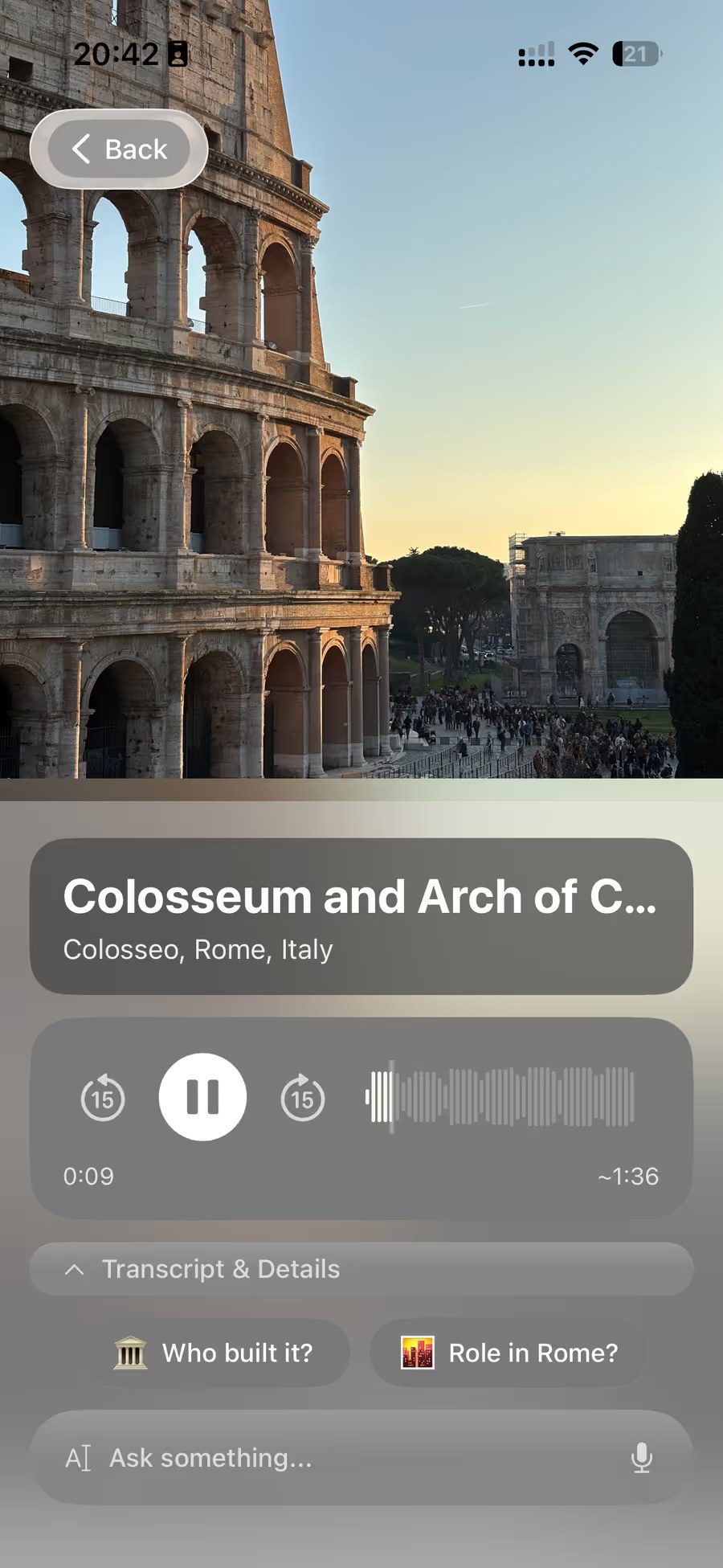
Then ask about the photo. This is where an old photo gets interesting. Ask “what’s changed here since the 1980s?” or “was the spire still there in 1995?” and Chiaro answers out loud. When the answer depends on today, like whether the building has been restored or is open to visitors, it checks the web for the current answer.
In your language, or theirs. Chiaro speaks 18 languages, in a woman’s or a man’s voice, so you can play the guide to the person in the photo in the language they think in. Place names appear in your language and in the local one, side by side.
Pin it. Every photo becomes a pin on the Map, so the old trip ends up on the same map as your new ones. And if you’d like to see the place again, Chiaro can plan the day for you, with opening hours, the weather and a backup plan for rain.
If your photos are from a recent trip rather than an old shoebox, we wrote a separate guide to finding out about the photos you took on your trip. And if you’re standing in front of the building right now, start with what building am I looking at.
See how recognition works
The landmark and museum pages on the Chiaro website are a demo of what the app does once it recognizes a place: 80 places, five stops each, playing in your browser with no account. Try Notre-Dame, the Eiffel Tower or the Sagrada Família. The place in your old photo doesn’t need to be on that list: in the app, the photo is enough.
FAQ
How can I find out where an old photo was taken?
Check the back of the print for dates and notes, scan the photo, look for clues in the frame such as signs, alphabets and architecture, and ask whoever was on the trip. Then run a reverse image search, or pick the scan in Chiaro, which recognizes the landmark and tells you its story.
Can Chiaro identify a landmark from an old photo?
Yes. You can pick an existing photo from your library, including a scan of an old print or slide, and Chiaro recognizes the landmark and plays its guide. You can then ask follow-up questions, such as what has changed since the photo was taken.
What’s the best way to scan old photos with a phone?
Use a scanner app rather than the camera. Google’s PhotoScan removes glare from glossy prints, and the document scanner in the iPhone’s Notes app straightens and crops the image. Shoot in soft, even daylight.
Why can’t image search find my old photo?
Search tools match images on the web today. If the landmark has changed since your photo was taken, if it’s small in the frame, or if it was photographed from an unusual angle, a match is harder to find.
The photo knows
Every old vacation photo was taken because someone stood in front of something and thought it was worth keeping. Finding out what it was is a way of finishing their trip for them.
Chiaro means “clear” in Italian. Get it on the App Store, pick the photo from the box, and listen.
Snap. Listen. Explore.